I’ve played with Ruby, but not with Rails. Upon being handed a Rails project to run with the CI Server I was a little thrown and confused. Here’s the solution we came to with some greatly appreciated help from @fearoffish to get Hudson to run the tests on a ruby project:
- check out the project source code.
- Download and install Ruby (if you’re on windows try the one click installer) and install rubygems too.
- try to figure out which database the developer has used (ask them! or check the config/database.yml file adapter value) – usually sqlite3 or mysql (after install use the detailed configuration and follow the defaults remembering to set your root password!). I used mysql and these instructions
- run:
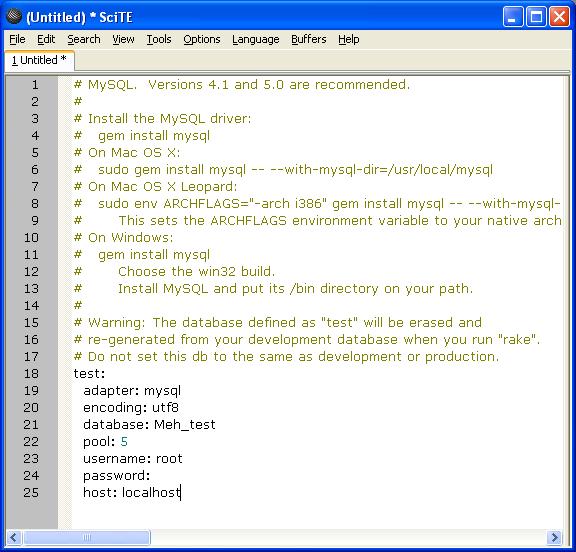
- in your source code there is a config folder with an automagically created “database.yml” file. Edit this to only show the “test” section as we’re only going to be running rake tests.
-

Database Configuration settings - run
- If you’re on a windows box you’ll see a few errors, in which case you need to (courtesy of the MySQL forum post below) download http://instantrails.rubyforge.org/svn/trunk/InstantRails-win/InstantRails/mysql/bin/libmySQL.dll and save it to your Ruby bin directory.
- now you’ll need to create the meh_test database:
rake db:create RAILS_ENV=test
rake db:migrate RAILS_ENV=test
- go to the root directory of your source code and run:
rake
- this should run all your tests.
- restart Hudson
- in Hudson, configure the project to check out the code and the other usual gubbins, but for the build step select “Execute Windows batch command” and in the text write:
- To get the bloody thing running:
gem install rails
gem install mysql
rake RAILS_ENV=test
Ruby script/sever –e production –d
-e to specify the db (was using development one by default which we didn’t have a definition for in conf/database.yml so it complained)
-d to daemonize it so it doesn’t just run on the command line but goes off to run in the background
 Gemma Cameron
